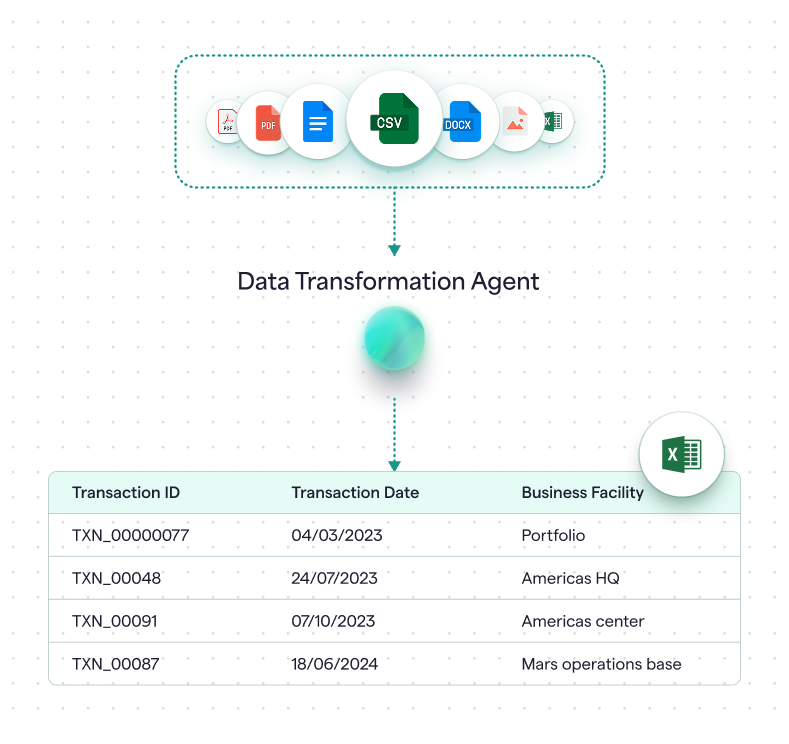
Data Transformation Agent

The Gap Analyzer Agent helps sustainability teams and advisory firms pinpoint what’s missing, what’s unclear, and what needs evidence—so you can move from draft to disclosure‑ready faster.

Turn raw data into enterprise decisions

  • Ingest data in many formats, including Excel, CSV, and PDF, through intelligent uploads that understand your data structure and map it to GHG Protocol-compliant templates by facility, time period, and reporting category.
  • Automatically fill gaps and flag compliance issues with AI-powered validation that identifies missing required fields, suggests data corrections, and highlights where primary data is needed to ensure audit-readiness from day one.
  • Process calculations at scale: with full transparency to see exactly which emission factors were applied, review transformation logic line-by-line, and track every mapping decision—without manual data wrangling.

Trusted by enterprises leading the way in sustainability

Faster ingestion, fewer format errors

Run data mapping workflows from raw files to upload-ready templates, so your team can focus on analysis, not spreadsheet wrangling.

Manual

Manual column mapping, endless reformatting

Manual data transformation is done in Excel with constant column-by-column mapping, date format fixes, and unit conversions—making the process slow and inconsistent across reporting cycles.

Validate, fix, repeat

Teams manually check for missing mandatory fields, flag format errors, and standardize values across files—making the validation process error-prone, slow, and difficult when new data sources arrive.

No reusable logic, weak audit trail

Mapping decisions live in email threads and internal notes, making it hard to track transformation rules or replicate the same process reliably for the next upload.
Agentic

Transform any format automaticallyTransform any format automatically

Upload raw activity data in Excel, CSV, or PDF and the agent analyzes the structure, maps columns to the required template, and standardizes formats—all without manual configuration.

Flag gaps and validate instantly

The agent automatically identifies missing mandatory fields, highlights where primary data is needed for compliance, and validates unit alignment—so you know what's ready to upload and what needs fixes.

Review and confirm with full transparency

See the detailed transformation logic, review the final mapped data side-by-side with the original, and confirm with one click—creating an auditable record of every mapping decision for assurance-ready uploads.

Accuracy by design

The Data Transformation Agent transforms messy source data into upload-ready inputs—designed so data quality stays transparent, mapping stays auditable, and outputs stay defensible.

Missing data flags itself

If mandatory fields are absent, the agent flags those rows for review instead of guessing—so you know exactly what needs correction before upload.

Trackable actions

The agent shows what it changed (dates standardized, IDs generated, fields mapped) and which records need your attention—making every step inspectable.

Consistent field mapping

Data is transformed into your exact template format with consistent field mapping and a clear breakdown of "ready to upload" vs. "flagged for review" records.

Insights into data quality problems

When missing values cluster in specific rows or patterns emerge, the agent identifies  source-data issues—not just listing failures, but highlighting where to fix them.

Questions About Unravel's AI Agents

See how Unravel AI Agents simplify reporting, boost accuracy, and accelerate climate action.

What file formats can the agent transform?

The agent accepts raw activity data in Excel, CSV, or PDF formats. It analyzes the file structure, automatically maps columns to the required template, and standardizes formats (like dates, units, country names)—regardless of how your source data is organized.

Can I review the transformation before it's finalized?

Yes. After the agent performs the automatic transformation, you see a detailed review showing the original data, the mapped structure, and any flags or changes made. Continue to chat with the agent to make tweaks to the data. When ready, you can confirm the mapping, then click Upload to submit—nothing happens without your approval.

What if my data doesn't perfectly match the template structure?

The agent intelligently maps your columns to the platform's required fields, even if naming or order differs. It flags missing mandatory fields, highlights format issues, and shows you exactly what needs correction before upload—so you know what's ready and what isn't.

Do I need to be a data expert to use the agents?

No—the workflows are guided. The agent handles column mapping, format standardization, and validation checks automatically. You review the final mapped data to ensure accuracy, but the technical transformation work is done for you.‹

What do I get at the end of a transformation workflow?

Upload-ready data in the platform's required template format, with clear flags showing which records are complete and which need fixes. The validated data is ready to submit for emissions calculation, and you have full visibility of what transformations were done.

See Unravel AI on one of your workflows.

Bring one dataset or one use case. We’ll show you how the agents run it end-to-end, and what “review-ready” looks like in practice.